Powerful Features for Modern File Management
A lightning-fast tool for secure multi-cloud file management—work visually in the local desktop app, or straight from your terminal. Same private engine either way.
Privacy-First File Management
File Fortress is a powerful CLI tool that connects to your cloud storage services while ensuring complete privacy. We never store your files or file metadata on our servers—only encrypted metadata that stays on your device.
- End-to-end encryption keeps your file metadata secure on your device
- File information never leaves your device without your permission
- No third-party access to your sensitive data
- We only store minimal account info: name, email, device names, and remote account count
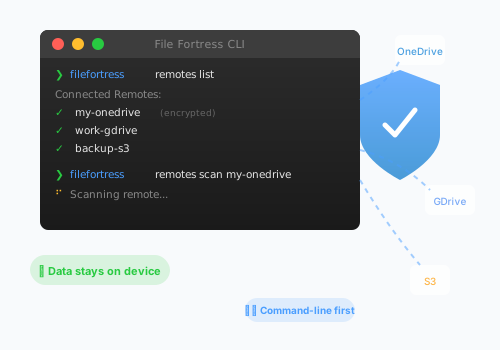
Connect Your Cloud Storage
Seamlessly integrate with all your favorite cloud storage providers.
Two Ways to Work: Desktop App or CLI
Power users live in the terminal. Everyone else can double-click File Fortress to open a full desktop app right in their browser—dashboard, file explorer, search, duplicates, and tools, all in one window. Same private, local engine underneath.
Across all configured remotes
The File Fortress desktop app, running locally on your machine. Illustrative data shown.
Opens in Your Browser
Double-click the app or run filefortress --gui. No install ceremony, no separate window framework.
Runs Entirely Locally
The app and the CLI share the same engine, so nothing ever leaves your device—your files stay in your clouds.
Everything in One Window
Dashboard, remotes, file explorer, search and AI search, duplicates, and enrichment tools—no command memorization required.
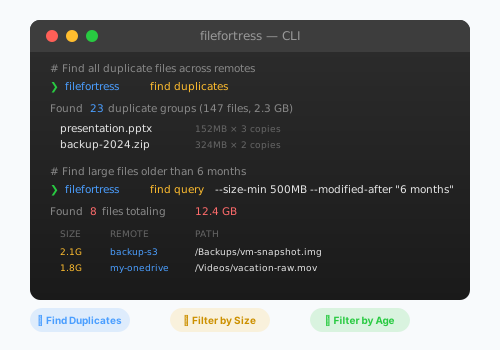
Powerful Query Commands
Query your entire cloud storage directly from the command line with expressive, scriptable commands.
Find & Remove Duplicates
Identify duplicate files across all your cloud storage, then delete the redundant copies directly with a dry-run preview and safety guardrails
Download Files & Folders
Pull a single file or a whole folder from any remote to your device, keeping its folder structure — from the CLI or the desktop app
Size-Based Search
Find files larger than a specific size to optimize storage
Age-Based Filters
Locate old files that haven't been accessed in months
Type Grouping
Group and manage files by type across all storages
Search Like You Think
Stop memorizing filter syntax. Just describe what you're looking for in plain English, and a local AI model translates your words into precise search filters. Your queries never leave your machine.
Local-First AI
Microsoft Foundry Local runs models like phi-3 right on your machine. No API keys, no cloud calls, no data leaving your device.
Dry-Run & Explain
Preview exactly what the AI interpreted before running any search. Full transparency, no surprises.
Multi-Provider Ready
Need more power? Connect OpenAI, Ollama, Azure, OpenRouter, or any OpenAI-compatible endpoint.
Privacy Preserved
Your search queries and file names stay on your machine. The AI sees only what you type, never your file data.
How File Fortress Works
Get started in just four simple steps.
Sign Up
Create your secure File Fortress account in seconds
Download CLI
Install our lightweight command-line tool
Register Device
Run filefortress setup
Connect & Sync
Run filefortress remotes add
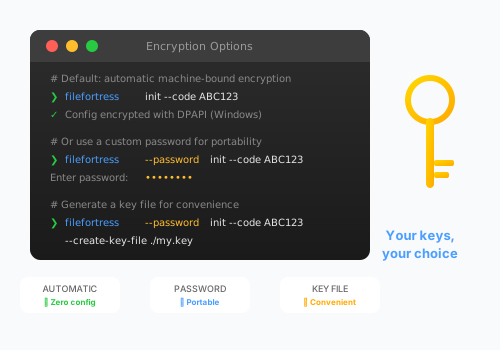
You Control the Encryption
Your local file index is always encrypted, and you get to choose the method via simple CLI flags.
Go passwordless with secure, machine-bound automatic encryption for convenience,
or use --password for maximum portability and control.
-
The default automatic mode provides robust, set-and-forget security on a single machine
-
Opt for a custom password to securely access your configuration on multiple devices
-
Create a key file from your password for convenient and secure authentication
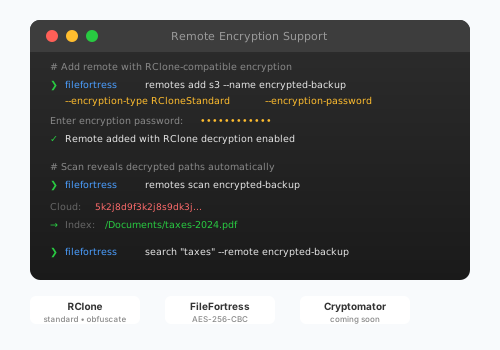
Remote Storage Encryption
FileFortress CLI supports encrypted remote storage, allowing you to work with files encrypted by RClone, Cryptomator, or other encryption tools. Scan and search your encrypted cloud storage directly from the terminal.
RClone Compatible
Full compatibility with RClone's standard and obfuscate encryption modes
AES-256 Encryption
Custom FileFortress encryption with industry-standard AES-256-CBC
Automatic Decryption
FileFortress automatically decrypts file paths during scanning for seamless searching
Local Enrichment Tools
Cloud providers like S3 and Backblaze don't analyze your files—they just store bytes. FileFortress changes that. Use local tools to extract metadata that your cloud doesn't provide, then search and filter by it.
FFmpeg / FFprobe
Extract video duration, dimensions, codec, bitrate, and frame rate from any video file—even on S3
ExifTool
Deep EXIF metadata extraction—camera make/model, GPS coordinates, lens info, exposure settings
File Hashers (Built-in)
Calculate MD5, SHA256, SHA1 hashes to find duplicates across all your clouds
MIME Type Detection (Built-in)
Detect true file types from file signatures, not just extensions
What You Can Do
-
Search S3 videos by duration:
--min-duration 30m -
Find 4K videos:
--min-width 3840 -
Filter by camera:
--camera-make Canon - Find duplicates by hash across all clouds
- Filter photos by GPS location
Tools run on your device. Files are downloaded temporarily, processed, then deleted.
Ready to Take Control of Your Files?
Join File Fortress today and experience the future of secure file management.
Get Started for Free